
- Data Consolidation & Data Cleansing
[Explained by a DB Company] What Is Data Consolidation? A Thorough Guide to Organizing and Managing Customer Data!

Last Updated: June 19, 2023

Click Here to Learn More About Data Matching ▶
Discover Exclusive,
Innovative Data Matching Techniques!
If you have arrived at this article, you are likely facing challenges such as having previously attempted to perform data matching on internal records only to encounter setbacks, or perhaps you are currently planning to start the process but are unsure where to begin.
This article explains how to consolidate data scattered across your organization, such as in SFA or CRM systems, in five steps. We recommend starting from the lowest level.
Table of Contents
1-1The Importance of Corporate Data Consolidation in Database Maintenance
2Level 0: Define the Objectives of Data Consolidation
3Level 1: Determine Target Data and Consolidation Rules
4Level 2: Consolidate Data Using Standard CRM or SFA Features
4-1Data Consolidation Features in Salesforce (Sales Cloud)
5Level 3: Export Data and Consolidate Manually Using Excel or Similar Tools
5-1Representative Excel Functions
6Level 4: Data Consolidation Using Specialized Tools
Recommended Articles
Data consolidation, or "nayose" in Japanese, originated as a financial term referring to the integration of multiple accounts held at a single financial institution into one. Today, the term has evolved to also mean the integration of identical data existing within a database into a single record.
Data Consolidation = Integrating identical data existing within a database into a single record
Reference Article:
[Explained by a DB Company] What Is Data Consolidation? A Thorough Guide to Organizing and Managing Customer Data! ▶︎
While there are various types of data consolidation, in the context of "consolidating databases within a company," it can be broadly classified into two categories: individual consolidation and corporate consolidation.
Individual consolidation refers to integrating identical individuals within a database into a single record. Typical examples include data at the individual level, such as contact persons or leads. Since SFA and MA systems are fundamentally designed to manage data on a per-person basis, individual consolidation is essential for accurately managing sales contact data.
Corporate consolidation refers to integrating identical companies within a database into a single record. Typical examples include data at the corporate level, such as clients or suppliers. This is crucial for Customer Data Management, preventing sales overlaps, and Implementing ABM.
Individual consolidation is relatively easier to implement because it is easy to set consolidation keys that are less prone to notation variations, such as full name plus email address (or phone number) (though it is by no means simple).
On the other hand, corporate names and addresses are prone to notation variations, and it becomes harder to set unified keys for small and medium-sized enterprises, government agencies, or specific business locations.
This article focuses on "Corporate Data Consolidation," which is more complex and carries higher importance.
As mentioned above, there are various types of data consolidation. Since the target data and consolidation rules change depending on the purpose, it is most important to clearly define "why you are performing data consolidation" and establish a common understanding among team members before starting.
Consider the purpose by working backward from the benefits. Typical benefits include:
● Preventing sales overlaps
● Improving data accuracy to enable effective marketing and sales activities
● Identifying appropriate new business opportunities through analysis of existing customers
(You may also need to consider methods for data enrichment beyond just consolidation.)
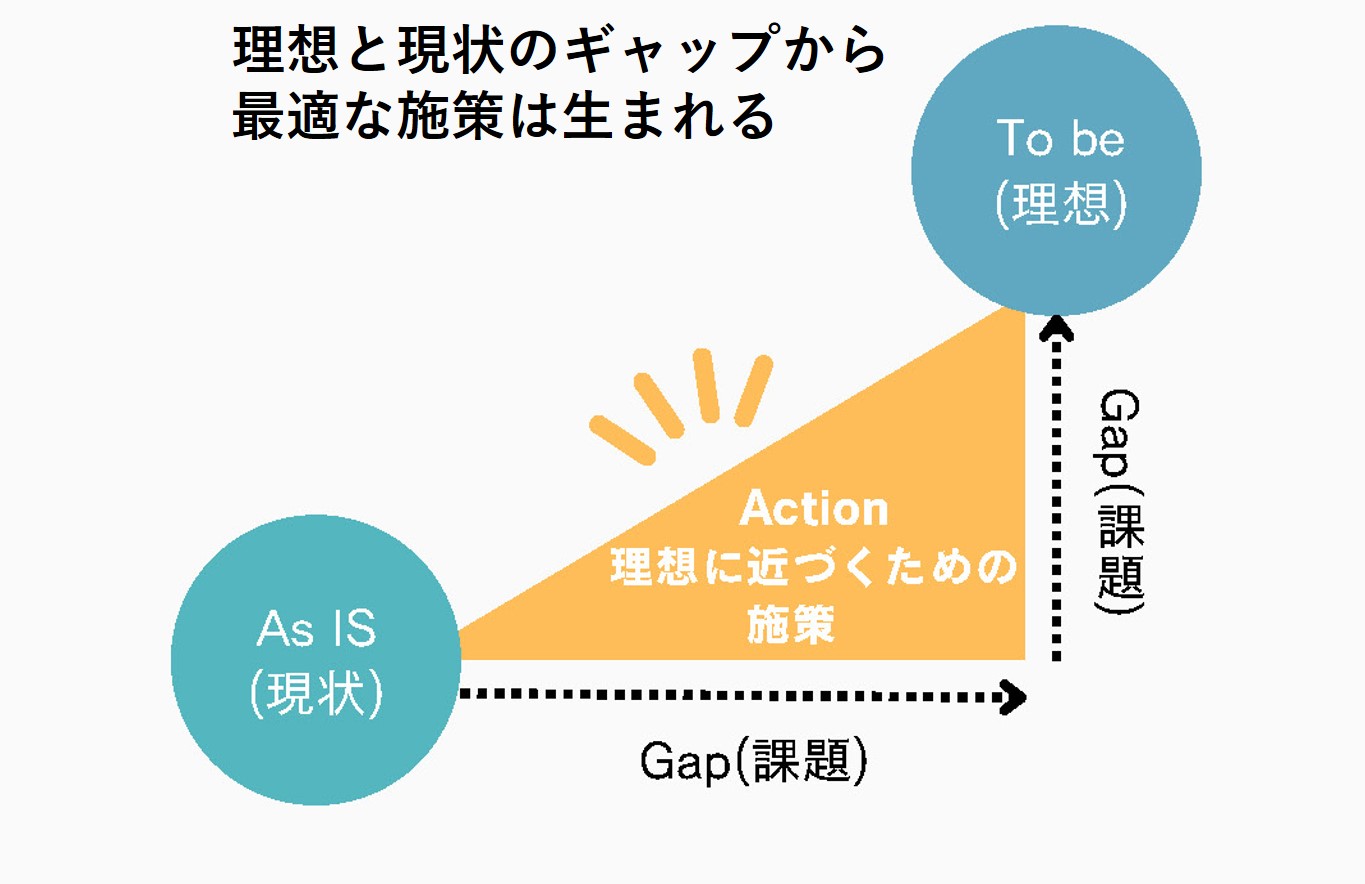
Determine the data to be consolidated according to your objectives. If internal data is scattered across CRM, SFA, MA, and business card management systems, consider using a data warehouse (a central repository for data).
Once the target data is determined, establish the rules for consolidation.
The two main components to decide are the "Consolidation Key" and the "Consolidation Logic."
Key: Information used as the condition for identifying duplicates.
Logic: Rules for handling scenarios not covered by the key, such as the priority of data when consolidation keys match.
Ideally, the consolidation key should be a symbol or code that uniquely links to the actual data, such as an email address for individuals or a corporate registration number for companies.
Define the consolidation logic for scenarios that cannot be covered by the key, such as when the key is blank or when identical data exists.
For example, if using an email address as the key, the logic might specify that for data with identical email addresses, records with a non-blank name should be prioritized.
Additionally, since it is difficult to completely eliminate all data duplication, it is also important to define the boundary of how far to consolidate and where to leave the data as is.
This section covers the actual steps for the consolidation process. If your company uses sales support systems like CRM or SFA, many tools come with built-in standard consolidation features that allow you to manage duplicate data.
Here, we will use Salesforce's Sales Cloud, a representative CRM/SFA tool, as an example.
Salesforce includes "Matching Rules" and "Duplicate Rules" as standard features for duplicate management.
Matching rules compare field values to determine if a record is sufficiently similar to an existing record to be considered a duplicate.
For example, a matching rule can specify that a record is a duplicate if the email and phone values of two records match exactly.-Sales Cloud: What Are Matching Rules?
Duplicate rules work in conjunction with matching rules to prevent users from creating duplicate records.
While matching rules determine if a record being created or updated is similar enough to be considered a duplicate of another, duplicate rules instruct Salesforce on what action to take when a duplicate is identified.
For example, duplicate rules can block users from saving records identified as potential duplicates, or simply notify users with an alert while still allowing the record to be saved.-Sales Cloud: What Are Duplicate Rules?
Matching and duplicate rules can be configured in Salesforce under [Setup] > [Data] > [Duplicate Management].
You can set conditions for each object and configure exact or fuzzy matching, allowing you to detect duplicates and consolidate data when creating or editing records.
![Configure settings from [Setup] > [Data] > [Duplicate Management] in Salesforce](https://usonar.co.jp/blog/img/Salesforce.jpg)
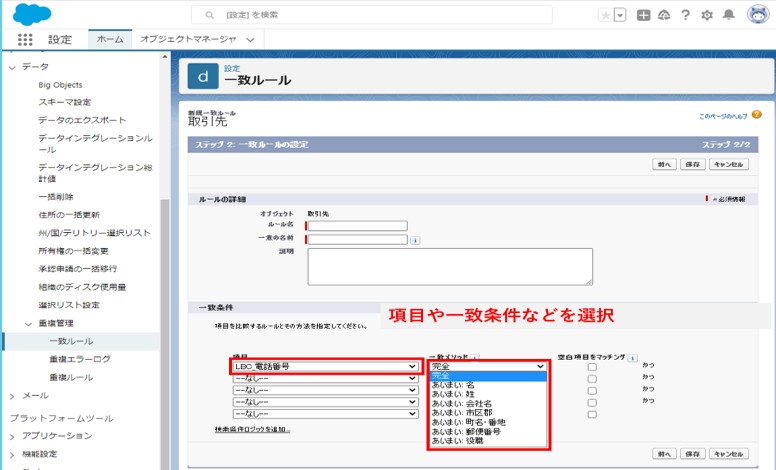
For more details, please check the Salesforce Guidelines.

For those who find that the standard features of CRM or SFA systems are too restrictive to perform satisfactory data cleansing, one alternative is to export the data from the target system and perform manual cleansing using spreadsheet software such as Excel.
The primary advantage of spreadsheet software like Excel is its high degree of flexibility. By utilizing appropriate functions, more complex condition settings and processing become possible. Representative functions are listed below.
| JIS Function | Converts half-width characters to full-width characters |
| ASC Function | Converts full-width characters to half-width characters |
| TRIM Function | Removes extra spaces |
| CLEAN Function | Removes line breaks |
| CONCATENATE Function | Combines text strings |
| VLOOKUP Function | Extracts values from another column where specific item values match |
| XLOOKUP Function | Extracts multiple values from another column where specific item values match |
| IF Function | Creates conditional logic |
It is important to manage items that are prone to multiple interpretations separately. For example, having only a single "Company Name" field often leads to issues such as inconsistent inclusion of legal entity types or branch names. By pre-defining separate fields for "Legal Entity Type," "Company Name," and "Branch Name," you can reduce data entry errors. Another major benefit of separating items is that it becomes easier to set data validation rules.
Once the extracted data has been cleansed, import it back into the system. At this stage, ensure you import the data using the unique ID stored within the system. If you do not use the ID, much of the imported data may be generated as new records, potentially resulting in a massive amount of duplicate data.
If you have created new fields, do not forget to create the corresponding fields in your CRM or SFA in advance.
There is a wide variety of types and causes for notation inconsistencies and data deficiencies. Corporate information, in particular, is updated daily due to company name changes, address relocations, mergers, and bankruptcies.
It is not realistic to capture all of these changes and maintain the data using only internal resources.
By using a specialized data cleansing tool, changes in corporate information are captured and automatically maintained. By also performing data entry through the specialized tool, you can keep your data clean.
Furthermore, by utilizing the unique codes assigned by the specialized tool, it becomes possible to centrally manage information that was previously scattered across different internal systems, departments, and business locations.
Missing information is supplemented from the integrated corporate information database, enabling more efficient sales activities using your data.
Please check the details below to learn how this differs from manual data cleansing and how to specifically implement it!
In this article, we explained how to perform data cleansing for existing internal data in five steps.
Data cleansing is a deep and complex task the further you delve into it. If you feel that your internal resources have reached their limits, why not consider introducing a specialized tool?
About the Author

uSonar Editorial Department
MX Group, Editor-in-Chief
We are the uSonar Editorial Department.
We provide information on data utilization and digital technologies useful for considering future business operations, primarily for companies engaged in B2B business.
uSonar is utilized by various companies
across a wide range of industries and sectors.
ITreview Grid Award 2026 Summer
Leader in 6 Categories

With uSonar,
we can help solve your company's challenges!
Case Studies and Sample Reports
Available for Download