- Data Matching and Cleansing
Understand Data Cleansing in 5 Minutes: Objectives and Practical Examples Explained
Last Updated: April 25, 2023

Click Here to Learn More About Data Matching and Data Cleansing ▶
Achieve High-Precision Data Maintenance
Through Office-Level Cleansing
To enable high-precision data analysis, the data used must be consistent. Therefore, for companies engaged in data utilization, the process of data cleansing to resolve data deficiencies such as missing values and duplicates is essential. This article explains the importance of data cleansing, the differences between it and data cleaning, the benefits of implementation, and key points for selecting data cleansing tools.
Table of Contents
2What Is the Difference Between Data Cleansing and Data Cleaning?
2-1Difference From Data Cleaning
2-2Difference From Data Matching, Which Is Often Confused
3Why Is Data Cleansing Necessary?
3-1Improves Data Analysis Accuracy
3-2Increases Operational Efficiency
3-3Reduces Data Management Costs
3-4Prevents Data Quality Degradation
4Two Methods for Implementing Data Cleansing
5Key Considerations for Selecting Data Cleansing Tools
5-2Scope of Attribute Data Enrichment
Recommended Articles
Data cleansing is the process of correcting inaccuracies in a database, such as duplicate entries or inconsistent formatting, to ensure that data is ready for effective use.
While corporate databases accumulate vast amounts of information, data quality often suffers when departments follow different input rules or when the granularity of data varies by respondent, preventing accurate analysis and utilization.
The following are examples of inaccuracies that hinder data utilization.
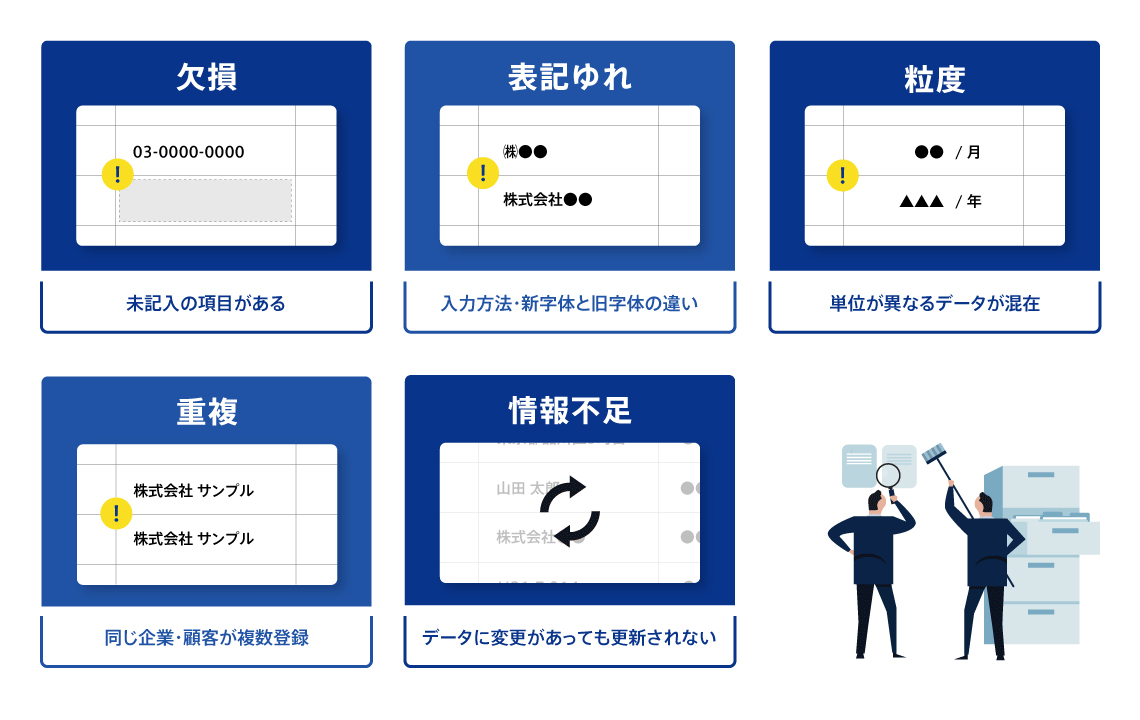
Only by resolving these data inconsistencies and ensuring integrity can data be effectively utilized.
Data cleaning is a term often used interchangeably with data cleansing. What are the differences between the two?
In conclusion, data cleansing is also referred to as data cleaning, and there is no difference in meaning between the two. Furthermore, data scrubbing is synonymous with data cleansing.
Data consolidation is sometimes considered part of data cleansing, and the two are often confused; however, each process serves a distinct purpose. While data cleansing is the process of improving data quality by eliminating inconsistencies and errors, data consolidation refers to the process of resolving duplicate registrations and integrating multiple data sets.
When integrating company-wide databases for data utilization, if the same company or customer exists as a duplicate in various departmental databases, you may inadvertently repeat the exact same approach to that entity. This can lead to negative feedback or a loss of corporate credibility. To prevent such situations, the process of data consolidation—which assigns IDs to attribute data such as company or customer names and addresses to identify and integrate identical entities—is essential. However, since variations in notation within registered data can reduce the accuracy of consolidation, it is crucial to complete data cleansing beforehand.
Why is data cleansing considered necessary for data utilization? It is important to fully understand the benefits and significance of performing data cleansing.
Using unorganized data inevitably reduces the accuracy of analysis. In customer databases, in particular, issues such as outdated, missing, or duplicate data are problematic. Analyzing noisy data prevents you from deriving accurate results, making it impossible to grasp the actual situation correctly. By resolving data deficiencies through data cleansing, you improve data quality and, consequently, analysis accuracy. Since marketing initiatives can be implemented based on highly accurate analysis results, the likelihood of achieving your expected outcomes increases.
If registered data contains duplicates or variations in notation, the searchability of the database decreases. Furthermore, if flawed data is used for analysis, you may be forced to redo the analysis later. Extracting and correcting problematic data on an ad-hoc basis is inefficient and causes operational interruptions, leading to a loss of time.
Data cleansing is essential to eliminate such wasteful tasks and improve operational efficiency. When data within a database is consistently organized and integrated, you can retrieve necessary information immediately and avoid the need to redo analyses, which is expected to boost productivity. Furthermore, as employees previously responsible for data correction see their task time reduced, they can focus on their core responsibilities, which also leads to a reduction in labor costs.
Operating a database incurs consistent costs. When incomplete or inaccurate data accumulates, it unnecessarily consumes server capacity, leading to excess expenses. By organizing data through data cleansing and integrating it via deduplication to remove unnecessary records, you can reduce the load on your servers and achieve significant savings in operational costs.
There are various reasons for data quality degradation, one of which is the lack of standardized data entry rules within an organization. When different departments input information from various sources using their own methods, the database becomes cluttered with inconsistent formats. Just as your internal servers require regular maintenance, data also requires ongoing care to maintain its quality. By establishing a regular schedule for data cleansing, you can prevent quality degradation and ensure that reliable data is always available for use.

There are two primary methods for implementing data cleansing. Choose the approach that best suits your company's specific situation.
If you handle a small volume of data, you may choose to utilize your own internal resources. If you have employees with extensive data knowledge, they may be able to perform the work efficiently. However, data correction generally does not require specialized skills and can be done manually. Handling this in-house has the benefit of saving on external outsourcing costs.
On the other hand, as data volume increases, the work becomes more complex. A significant disadvantage is the increased operational burden on employees who must manage data in addition to their primary responsibilities. This often leads to more errors and oversights, which can degrade not only data quality but also overall operational efficiency. Furthermore, if different departments operate separate databases, the sheer volume of data makes it unrealistic to rely solely on internal resources.
If your internal resources are insufficient or if you are handling massive amounts of data, you should consider using a data cleansing tool. These tools allow you to cleanse large volumes of data efficiently. By automating manual tasks, you reduce human error and ensure that data is organized more accurately.
While there are costs associated with implementing and using these tools, they offer significant reductions in human labor costs and time compared to performing the work in-house.
☆-☆-☆ CTA Banner Start ☆-☆-☆
When comparing data cleansing tools, what criteria should you use to find the right one for your company? This section introduces important points to verify when selecting a tool.
First, check the volume of corporate information held by the data cleansing tool. Each provider maintains its own proprietary corporate database to provide users with accurate information. The larger the database, the higher the likelihood of finding matches when cross-referencing with your own records. If you implement a tool with limited corporate data, the match rate with your internal database will be low, meaning the cleansing process is unlikely to enrich your data significantly. Beyond the sheer number of records, it is also important to consider how well the tool covers your specific industry.
The types of information (fields) that can be enriched vary by tool, so prior verification is essential. Examples of corporate information that can be enriched include:
The information required depends on the purpose of your data cleansing. Research how well the data fields provided by the tool cover the requirements for your company's analysis.
The frequency of corporate information updates is another critical point. Corporate details such as company names and addresses change frequently due to office relocations, mergers, and acquisitions. Continuous data maintenance and updates are necessary for accurate data utilization. If data is updated appropriately, high quality can be maintained. While update frequencies vary by tool—ranging from monthly or weekly to daily—a higher frequency is not always inherently better. The necessity of updates depends on the nature of your data. If your data changes rapidly and requires precision, a higher update frequency is preferable. The most important factor is whether the tool can detect these changes and update accordingly. When selecting a tool, consider the nature of your data and the frequency of updates required.
Before full-scale implementation, be sure to calculate the costs thoroughly. If your company handles a small amount of data, free tools might suffice. However, paid tools generally offer more features and additional options. If you handle large volumes of data and require robust functionality and security measures, we recommend using a paid tool. Some tools do not publish pricing on their websites, so be sure to inquire and request a quote.
☆-☆-☆ CTA Banner Start ☆-☆-☆
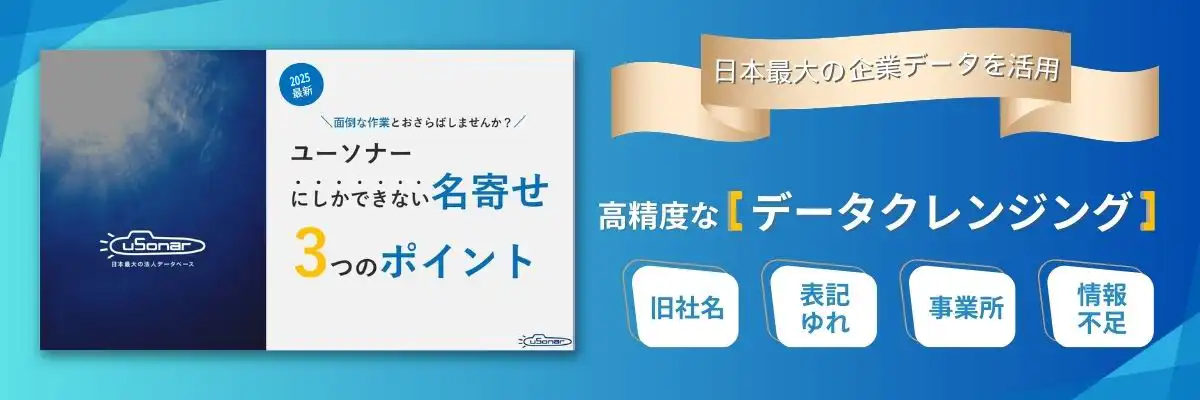
Data cleansing refers to the process of correcting data inaccuracies to ensure it is in a usable state. When the same data exists across multiple databases, eliminating duplicates and integrating the records improves data quality and enables accurate analysis. We recommend implementing a data cleansing tool to perform this process efficiently. uSonar is one of Japan's largest corporate databases, providing solutions that assist with data maintenance, deduplication, and analysis. It offers high-level cleansing precision, enabling the centralization of customer information and the automation of attribute enrichment. If you are considering implementation, please feel free to contact us.
About the Author

uSonar Editorial Department
MX Group, Editor-in-Chief
We are the uSonar Editorial Department.
We provide information on data utilization and digital technologies useful for rethinking future business operations, primarily for companies engaged in B2B business.
uSonar is utilized by various companies
across all industries and sectors.
ITreview Grid Award 2026 Summer
Leader in 6 Categories

With uSonar,
we can help solve your company's challenges!
Case Studies and Sample Reports
Available for Download