- CRM/SFA/MA
Key Points for SFA Implementation and Adoption: Tips for Achieving Results Based on Case Studies

Updated: April 3, 2023

Click Here to Learn More About CRM/SFA ▶
5 Key Points for Leveraging CRM/SFA
What Is the "Truth" That Tool Vendors Won't Tell You?
While CRM and SFA are both representative IT tools for sales departments, many people find it difficult to distinguish between them because they share some common features. The primary difference is that CRM (Customer Relationship Management) focuses on managing customer relationships, whereas SFA (Sales Force Automation) focuses on managing and automating the entire sales process. This article provides an introduction to both CRM and SFA, explains their differences and benefits, and offers guidance on how to choose the right solution.
Table of Contents
1What Is CRM (Customer Relationship Management)? What Is SFA (Sales Force Automation)?
1-1CRM (Customer Relationship Management) for Visualizing Customer Information
1-2SFA (Sales Force Automation) for Visualizing and Streamlining Sales Activities
2Differences Between CRM and SFA
3Differences From MA Often Discussed Together
4Benefits of Utilizing CRM and SFA
4-1Centralized Information Management
4-2Real-Time Information Sharing
4-3Mitigating Dependency on Specific Individuals
5Key Selection Criteria for CRM and SFA
6Key Considerations for CRM and SFA Implementation
Recommended Articles
First, we will explain the fundamental knowledge of what CRM and SFA tools are.
CRM (Customer Relationship Management) is a tool used to manage customer data. CRM helps companies centralize and analyze all data related to customers, which is essential for building and maintaining strong customer relationships.
By consolidating customer data in a CRM, you can track customer information across all touchpoints of the customer journey. This includes purchase history, engagement with marketing campaigns, and interactions with customer support. By deepening your understanding of each customer through this information, you can improve operations across various departments involved with customers, including sales, marketing, and customer service.
In addition to managing and analyzing customer data, CRM is equipped with features for efficient customer outreach, such as automated email distribution and campaign management. Thus, CRM is characterized by its focus on features centered on customer relationships.
SFA (Sales Force Automation) is a tool designed to support sales operations. Equipped with features to facilitate sales activities toward prospective customers and manage customer information, SFA helps sales departments improve operational efficiency and productivity.
For example, sales departments often handle numerous repetitive tasks that require system input, such as creating quotes, daily or weekly reports, and managing tasks or deals. Since SFA can automate many of these administrative tasks, sales representatives can quickly complete routine work and dedicate more time to customer engagement. Additionally, SFA includes features to visualize sales performance and revenue forecasts, which can be used to evaluate and analyze the performance of the entire department or individual representatives.
SFA does share some commonalities with CRM, such as the ability to manage customer information. However, looking at the overall functionality, it is clear that SFA is a system focused more on supporting sales representatives and their specific tasks rather than just the customers themselves.
Based on the characteristics mentioned above, the differences between CRM and SFA can be summarized as follows.
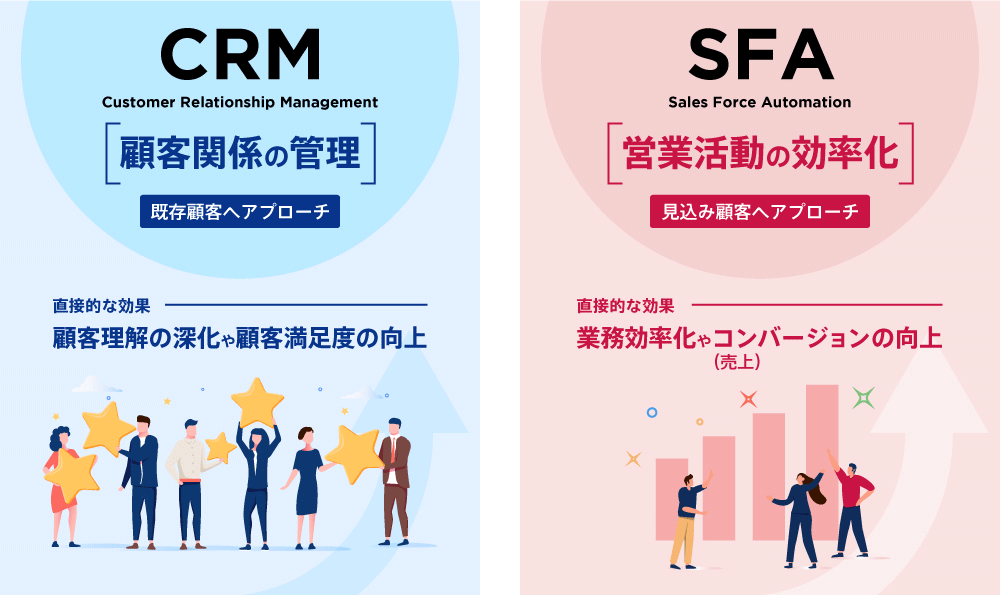
Broadly speaking, CRM is a tool for maintaining positive relationships with existing customers acquired through sales activities. In contrast, SFA focuses on automating sales activities and managing prospective customers, with the goal of increasing revenue and converting prospects into customers. Therefore, it is recommended to use SFA for prospective customers and CRM for existing customers, depending on the customer's stage in the lifecycle and your specific objectives. Alternatively, you may choose an all-in-one solution that integrates both CRM and SFA functionalities.
CRM and SFA are also frequently compared with MA. MA stands for Marketing Automation, and as the name suggests, it is a tool specialized in automating marketing tasks. While MA can also acquire and manage customer information like CRM and SFA, its strength lies in discovering and nurturing leads (prospective customers) and converting them into business opportunities. In other words, following the progression of the customer journey, the optimal tool changes in the order of "MA → SFA → CRM."
By utilizing CRM and SFA, you can expect the following benefits.
CRM allows for the centralized management of customer information, while SFA primarily centralizes sales information.
For example, while modern companies connect with customers through various online channels, failing to consolidate the information gathered from these channels makes it impossible to see the full picture of the customer. By aggregating customer information in a CRM and sharing it company-wide, you can fully leverage customer data across departments.
Furthermore, centralized management of sales information via SFA leads to more efficient sales activities. If the progress of deals handled by each representative is appropriately shared, managers can easily determine when and what kind of support is needed. Additionally, visualizing sales performance and revenue forecasts is useful when considering mid- to long-term sales strategies.
Another benefit of CRM and SFA is the ability to share information in real time.
By implementing cloud-based CRM or SFA services, you can check and share information regarding customers and sales from outside the office. For instance, you can review information about a client while on the move or update and share sales data without needing to return to the office.
In particular, since SFA can automate and streamline the creation of documents like daily reports, it reduces the operational burden while increasing the speed of information sharing. Being able to refer to the latest information at all times is crucial for optimizing customer service.
CRM and SFA also help mitigate the risks associated with information and tasks becoming dependent on specific individuals.
In sales departments where representatives are often working off-site, information sharing tends to be neglected. A state where tasks are known or performed only by specific individuals is called "dependency on individuals," which leads to opaque business processes and can cause errors, troubles, and misconduct.
Moreover, Japanese companies with rigid vertical structures often fall into a state of "siloing," where data is managed separately by each department. Since different departments refer to different customer data, it leads to discrepancies in customer understanding, making siloing an obstacle to implementing a consistent customer strategy.
By introducing CRM and SFA, which promote the centralized management of customer and sales information, you can prevent such dependency and siloing. This also makes the process of handing over necessary information and know-how to new personnel much smoother.
When selecting CRM or SFA products, what criteria should you use to make your decision?
First and foremost, it is essential to clarify your objectives—specifically, what business challenges you want to solve with the tool. As discussed, while CRM and SFA have some commonalities, they also possess many distinct characteristics.
For example, if you want to promote centralized management of customer information across the entire company, CRM is more suitable. If you want a tool specialized in streamlining sales department operations, SFA is more appropriate. Of course, if your budget allows, it is also recommended to implement both to leverage their complementary effects or to introduce an integrated CRM tool that includes SFA functionality.
In any case, rather than starting with the perspective of "CRM versus SFA," the key is to think from the perspective of your needs (functional requirements), such as "what functions are necessary to achieve our company's goals." The purpose of introducing a tool could include improving productivity, increasing operational efficiency, enhancing customer satisfaction, or a combination of these. Also, since it is meaningless if the staff on the ground cannot use it, you must check for ease of use. Furthermore, considering factors such as the quality of the support system from multiple perspectives is indispensable.
Once you have finished selecting your product, you will need to take steps to implement and establish the tool within your organization. There are two important points for ensuring the success of this initiative.
Introducing a tool is merely a milestone. What matters is establishing the tool and achieving the objectives you initially set. To ensure the tool is adopted, it is important to focus not only on the product's ease of use and the quality of support but also on efforts made by the users themselves.
For example, using a trial version to verify usability or preparing manuals tailored to the new tool are concrete examples. It is also worth considering reforming your internal structure and business processes in conjunction with the tool's implementation.
In relation to organizing your internal structure, it is also important to secure personnel who can master the tool. For instance, by analyzing the customer data accumulated in your CRM or SFA, you may gain important insights that can be utilized for sales and marketing.
Therefore, to fully leverage CRM and SFA, it is crucial to secure personnel with strong IT skills, such as data analysis. Additionally, having such personnel on hand allows for quick internal responses to inquiries regarding tool usage or technical issues, which helps in establishing the tool within the workplace.
While CRM is a tool primarily aimed at managing information on existing customers, SFA is a tool focused on streamlining sales processes. Therefore, whether you should implement CRM or SFA depends on your specific objectives and what you aim to achieve through the tool's implementation. If possible, it is recommended to utilize both CRM and SFA to create synergistic effects or to introduce a CRM that includes SFA functionality. By clarifying your company's implementation goals and understanding the fundamental differences between CRM and SFA, you will be better positioned to increase the effectiveness of your tool implementation.
Author

uSonar Editorial Department
MX Group, Editor-in-Chief
We are the uSonar Editorial Department.
We provide information on data utilization and digital technologies useful for companies primarily in the B2B sector to rethink their future business operations.
uSonar is utilized by various companies
across a wide range of industries and sectors.
ITreview Grid Award 2026 Summer
Leader in 6 Categories
uSonar Can Help Solve Your Business Challenges!
Case Studies and Sample Reports Available for Download
View All Materials