




















Business Card Management Optional Service: Business Card Data Correction Service
Business Card Management Optional Service: Business Card Data Correction Service
The Business Card Data Correction Service is a solution where human operators verify and correct errors in business card data to ensure accuracy.
Simply by scanning your business cards, you can build an accurate business card database.
This service is ideal for companies intending to utilize business card data for secondary purposes such as SFA or CRM.
Basic Service Specifications
■ Language
・ Japanese/English
・ In principle, Japanese fields on the business card are prioritized for data entry.
・ If no Japanese fields are present, English fields will be used for data entry.
・ Business cards in Chinese are not eligible for correction. Please utilize the data captured via OCR.
■ Sides Subject to Data Entry
・ Both the front and back sides are subject to correction.
■ Business Card Image Files
・ Data is entered with the business card oriented correctly.
■ Error Input
・ Kanji characters that cannot be entered in Japanese or unreadable characters will be entered as a half-width "?".
Special characters, partially blurred text, or other unreadable characters/fields will be entered as a half-width "?".
■ Non-Correctable Items (Charged as a used unit)
The following cases are classified as "Non-Correctable." The data will remain in its pre-correction state.
・ Business cards in languages other than Japanese or English where no text can be entered.
(However, if readable characters such as phone numbers or email addresses exist, they will be entered.)
・ Business card images that are blurry, soiled, or judged to be largely unreadable.
・ Images other than business cards (e.g., membership cards, medical examination tickets, postcards).
・ Business cards that are entirely handwritten.
・ Cases where two business cards were scanned simultaneously, and important information is obscured or cut off, making entry impossible.
・ Cases where the operator cannot confirm or enter the data upon visual inspection.
・ If a correction request was made in the application but the administrator revoked the correction authority while the status was "In Progress" or "Corrected" by the operator.
(If the status is "Before Confirmation" by the operator, it is treated as "Uncorrected," the request is canceled, and no charge is applied.)
Content Heading/Body/Image: 2
Corrected Data Fields
| No. | Field | Content |
| 1 | Company Name | Corporate names, government office names, membership organizations, group names, shop names, etc. |
| 2 | Company Name (Kana) | Phonetic reading of the company name (excluding corporate status) |
| 3 | Department/Title |
Department, job title, or occupation listed as a title. Includes both department and job title. |
| 4 | Job Title |
The portion corresponding to the job title within the Department/Title field. Automatically extracted by the system from the "Department/Title" field. Example: If the business card lists "Sales Division, Sales Section 1, Manager": Department/Title = "Sales Division, Sales Section 1, Manager"... All data as listed Job Title = "Manager"... Data automatically extracted as the job title. |
| 5 | Name (Full Name) |
Name listed in Kanji or Katakana. For alphabetical notation: Surname: Last Name, Given Name: First Name + Middle Name If divided into 3 or more parts, all remaining characters are entered into the surname field. |
| 6 | Name (Kana) | Phonetic reading of the name. For alphabetical notation: The Kana field will contain the same result as the Name (Full Name) field. |
| 7 | Email Address | Primary email address |
| 8 | Phone Number | Phone number (up to 2 numbers) |
| 9 | FAX | FAX number (one representative number) |
| 10 | Mobile Phone | Mobile/PHS phone number starting with 070, 080, or 090 |
| 11 | Address (Postal Code) | 3-digit or 7-digit postal code |
| 12 | Address (Prefecture) | Name of one of the 47 prefectures in Japan |
| 13 | Address (City/Ward/Town/Village) | City, ward, town, or village name. If the address is listed in English/Roman characters or is an overseas address, the information listed in that block will be delivered in a single field. In this case, the address fields (Postal Code, Prefecture, Street Address, Building Name) will remain in their pre-correction state. |
| 14 | Address (Street Address) | Address following the city/ward/town/village |
| 15 | Building Name | Building name, floor number, room number, P.O. Box, and other mailing information |
| 16 | URL | Company website URL (Twitter or Facebook accounts are not subject to entry) |
Content Heading/Body/Image: 3
Input Priority
Regarding telephone numbers, the two numbers with the highest priority will be entered as 1 and 2, respectively.
However, there are exceptions for certain items to prioritize user convenience.
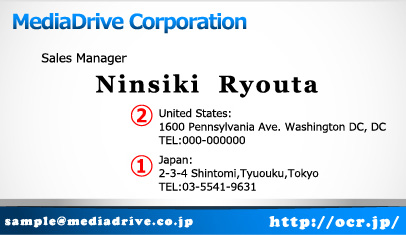
■ Priority 1: Information written in Japanese is prioritized.
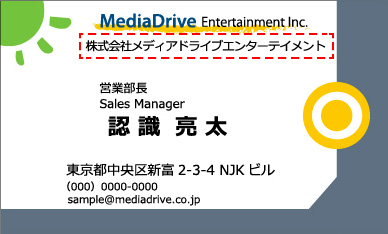
■ Priority 2: Information with a larger font size is prioritized.
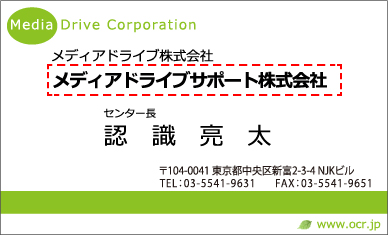
■ Priority 3: Information located closer to the top-left is prioritized.

■ For English Business Cards: Japanese information is prioritized.
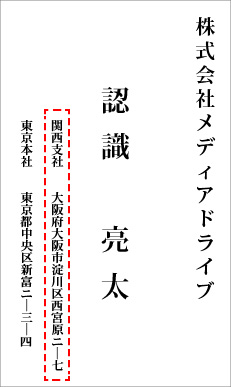
■ For Vertically Oriented Business Cards: The top-right is prioritized.
Content: Heading, Body, and Image: 4
Correction Data Format (Common to All Items)
Data is maintained in UTF-8.
Please note that unsupported characters may result in garbled text.
■ Format by Character Type
・Alphanumeric characters are entered in half-width (single-byte) format.
・Symbols that can be represented in half-width are entered in half-width format.
・Spaces are entered as half-width spaces.
・Katakana are entered in full-width (double-byte) format.
■ Error Characters
・Kanji that cannot be entered on a PC with a Japanese OS will be replaced with a question mark (?).
Example: Surname = "Taka?" (when the character for 'Hashi' in Takahashi is an obsolete variant).
・If the business card image is unclear and cannot be entered, a question mark (?) will be entered.
Example: Email Address = "meishi.taro@?" (when part of the image is unreadable or cut off).
■ Examples of Unsupported Characters
・For Kanji that have commonly used alternative characters, the alternative character will be used for entry.
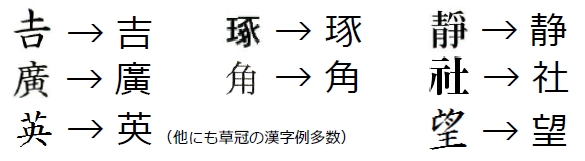
■ Examples of Supported Characters
The following Kanji can be entered exactly as they appear on the business card.
(Examples)
髙, 﨑, 國, 舘, 鐵, 曾, 來, 遙, 眞, 櫻, 邊, 邉, 濱, 濵, 德, 隆, 斎, 齊, 齋, 栁, 瀨, 塚, 黃, 賴, 祥, 嵜, 莊, 槗, 學, 亞, 榮, 澁, 將, 靜, 淺, 嶌, 惠, 讓, 聰, 續
Content: Heading, Body, and Image: 5
Correction Data Format (Company Name)
会社名には一般的な法人をはじめ、特殊法人や、団体名、機関名などを入力します。
データ形式
| Conversion Rules | Business Card Entry Example | Input Data |
| Enter Corporate Status Exactly as Written | Fureai Center Association | (As Stated) |
| Convert abbreviated corporate entity types to their full legal forms | Lego Trading Co., Ltd. | Lego Trading Co., Ltd. |
| Trim spaces before and after the corporate entity type | Lego Trading Co., Ltd. | Lego Trading Co., Ltd. |
| Do not include spaces within corporate names in Japanese. Include spaces for English names. | I Technology Co., Ltd. Rego Entry Inc. |
i-Technology Co., Ltd. (As Stated) |
| The middle dot '・' remains as is | IBM Japan, Ltd. | (As Stated) |
| Convert the archaic character '會社' to 'Company' | Nippon Steel Corporation | Nippon Steel Corporation |
訂正仕様
| Correction Rules | Business Card Entry Example | Input Data |
| Do not enter company descriptions such as group names or certification status, nor abbreviations of company names. | Net Group Network Japan Co., Ltd. (NWJ) Certified Member of the Japan Eco Promotion Association |
Network Japan Co., Ltd. |
| Do not enter branch names, department names, or company divisions following the company name (enter these as job titles). | Denpaku Shoji Co., Ltd. HR Company | Denpaku Shoji Co., Ltd. |
| Enter the official name of unions and associations as the company name. | JA Nagano Matsumoto Agricultural Cooperative | Matsumoto Agricultural Cooperative |
| Enter shop or store names as the company name. Do not enter general terms used for classification or description (such as Kappo, small restaurant, seasonal cuisine, or location names) if they are determined not to be part of the official store name. | Kappo Yamadaya | Yamadaya |
| Beauty Salon BEAUTY Ginza Branch | BEAUTY (Ginza Branch is the Department/Position) |
|
| Enter the School Name as the Company Name (Enter the Faculty/Department as the Department/Position) |
Keio University, Faculty of Science and Technology | Keio University (Faculty of Science and Technology is the Department/Position) |
| For Educational Foundations, enter only the Corporate Name (Enter the School Name as the Department/Position) |
Ogaki Gakuen Educational Foundation, Ogaki Kindergarten | Ogaki Gakuen Educational Foundation (Ogaki Kindergarten is the Department/Position) |
| For medical corporations, enter only the corporate name. (Enter the hospital name as the department or title.) |
Saiseikai Medical Corporation, Mita Hospital | Saiseikai Medical Corporation (Mita Hospital is the department or title) |
| For prefectural agencies and public institutions, enter the name up to the prefecture or municipality level as the company name. | Yokohama City, Totsuka Ward, Welfare Division | Yokohama City, Totsuka Ward (Welfare Division is the department or title) |
| Nagano Prefecture, Tokyo Office | Nagano Prefecture (Tokyo Office is the department or title) |
|
| For government offices, enter the largest ministry or agency name listed. (If no ministry or agency is listed, enter the name of the largest organization identified.) | Ministry of Defense, Japan Ground Self-Defense Force | Ministry of Defense (Japan Ground Self-Defense Force is the affiliated position) |
| Japan Ground Self-Defense Force, Communication Systems Unit | Japan Ground Self-Defense Force | |
| For business cards of assembly members, enter the affiliated assembly or the political party listed most prominently as the company name. | Member of the House of Representatives | House of Representatives (Member of Parliament is the affiliated position) |
| Democratic Party Member of the House of Representatives | Democratic Party (Member of the House of Representatives is the affiliated position) |
|
| Tokyo Metropolitan Assembly Member | Tokyo Metropolitan Assembly (Member is the affiliated position) |
|
| Enter national, prefectural, and similar entities as they appear in the company name. | The National Museum of Modern Art | The National Museum of Modern Art |
| Yokohama Municipal Daiichi Elementary School | Yokohama Municipal Daiichi Elementary School |
■会社名(カナ)
・弊社の企業マスタと照合して会社名カナを補正いたします。
・企業マスタと照合されない場合は補正されない可能性があります。
データ形式
|
Content Headings, Body Text, and Images: 6
Corrected Data Format (Department and Job Title)
・名刺に肩書きとして記載されている部署や組織、役職、職種、役割などを記載のまま入力します。
部署の大きさの順に並べ替えたり、部署、役職の順での並べ替えはされません。記載のとおりとなります。
・原則として封書や文書、メールの「宛名」として記載される対象を入力します。
資格や免許(○○士、○○認定者など)や、会員(○○会認定会員)などの付帯情報、「新人」や「修行中」などの一時的な情報は、所属にも役職にも該当しないため、入力されません。
住所や建物名のそばに記載されている、建物などの説明と判断される付帯情報(○○センター、○○工場、○○研究所)などは入力されません。
データ形式
| Conversion Rules | Business Card Entry Example | Input Data |
| Enter Spaces and Line Breaks Exactly as They Appear | Representative Director and Executive Vice President and General Manager of Sales Division |
(As Written) |
| Remove Unnecessary Spaces Within Words | Representative Director President |
Representative Director President |
| Enter English Text Line by Line | Sales General Manager |
Sales General Manager |
訂正仕様
| Correction Rules | Business Card Entry Examples | Input Data |
| If department or job titles are listed in multiple locations, enter them in descending order of seniority. | Denpaku Shoji Co., Ltd. Advertising Division Sales Department, Sales Section 2 Manager Taro Tanaka |
Advertising Division Sales Department, Sales Section 2 Manager |
| Extract and enter branch names or organizational units listed immediately after the company name. | Finance Department, General Manager, Taro Tanaka Lego Shoji Co., Ltd. Osaka Branch |
Osaka Branch Finance Department, General Manager |
| Shinjuku City Office, Welfare Division Division Manager, Taro Tanaka |
Welfare Division Division Manager *Company Name: Shinjuku City Office |
|
| Parliamentary Vice-Minister of Land, Infrastructure, Transport and Tourism | Parliamentary Vice-Minister *Company Name: Ministry of Land, Infrastructure, Transport and Tourism |
|
| Do Not Enter English Translations for Japanese Affiliations and Titles | Sales Manager Sales Manager |
Sales Manager |
| Enter English Translations That Differ in Meaning from the Japanese Affiliation and Title | Representative Director and CEO | President and CEO |
| Information Systems Department System Administrator |
Information Systems Department System Administrator |
|
| If two company names and their respective titles are listed, please enter the title for the primary company. | Chairman, Kawasaki Shoji Co., Ltd. President and CEO, Kawasaki Shuzo Co., Ltd. |
Chairman *Company name is Kawasaki Shoji |
■役職
・「所属役職」として入力されたデータから、「所属」と「役職」を分離して入力します。
・システムによる自動抽出のため、100%の精度保証の対象データではありません。
訂正仕様
| Correction Rules | Business Card Entry Examples | Input Data (Department) |
Input Data (Job Title) |
| Department and Job Title are separated | Sales Department, Sales Section 2 Manager |
Sales Department, Sales Section 2 | Manager |
| When all strings are identified as Job Titles | President and Representative Director | President and Representative Director | |
| If no string is identified as a Job Title, it is classified as a Department | Sales Department, Sales Section 2 | Sales Department, Sales Section 2 | |
| If multiple job titles are identified, enter all titles. If the department and job title span multiple lines, separate and enter them line by line. | Sales Division Deputy General Manager Concurrently Serving as General Manager of Marketing Department |
Sales Division | Deputy General Manager Concurrently Serving as General Manager of Marketing Department |
| Sales Division Deputy General Manager Concurrently Serving as General Manager of Marketing Department |
Sales Division Deputy General Manager Concurrently Serving as General Manager of Marketing Department | ||
| If the department and job title span multiple lines, separate and enter them line by line. | Osaka Branch Finance Department General Manager |
Osaka Branch | Finance Department General Manager |
| If the department name is on a single line, separate it with a space when entering. | Engineering Department, Chief | Engineering Department | Chief |
| For English, do not use spaces to separate; enter the job title exactly as it appears. | General Manager | General Manager |
Content Heading, Body, and Image: 7
Correction Data Format (Surname/Given Name)
・Names written in Kanji or Katakana are separated into "Surname" and "Given Name" fields.
・Names in English or Roman characters are separated into "First Name (F) + Middle Name (M)" and "Last Name (L)" fields.
Correction Specifications
| Correction Rule | Business Card Example | Input Data |
| If there is a middle name in Katakana, enter it together in the "Given Name" field. | Tanaka Jessie Miyoko | Surname: Tanaka Given Name: Jessie Miyoko |
| If only a "Given Name" is provided, enter it in the "Given Name" field. | Akemi | Surname: (Blank) Given Name: Akemi |
| Do not enter maiden names or nicknames. | Ota (Maiden Name: Tanaka) Satomi | Surname: Ota Given Name: Satomi |
| For joint names, enter only the first person. | Yamada Junichi/Riko | Surname: Yamada Given Name: Junichi |
| For Japanese business cards with English/Roman character names, enter them into Surname and Given Name fields in the order they appear. | Masato Tanaka | Surname: Masato Given Name: Tanaka |
| Takahashi Ichiro | Surname: Takahashi Given Name: Ichiro |
|
| For English business cards, enter "First Name (F) + Middle Name (M)" into the "Given Name" field and "Last Name (L)" into the "Surname" field. | John Smith | Surname: Smith Given Name: John |
| John F Smith | Surname: Smith Given Name: John F |
|
| Do not enter English honorifics. | John Smith, Ph.D. | Surname: Smith Given Name: John |
■ Name (Katakana)
・Enter the phonetic reading in Katakana, separated into "Surname" and "Given Name".
・If the reading derived from the email address account portion matches the reading candidate in the name dictionary, that Katakana reading is automatically assigned.
・Next, the correct Katakana is assigned based on a visual check of the furigana or Roman character notation on the business card.
・If there are multiple reading candidates and the exact reading cannot be determined from the business card, the most frequently used common Katakana is assigned for the surname. The given name remains in its pre-correction state.
Correction Specifications
| Correction Rule | Business Card Example | Input Data |
| If there is a middle name in Katakana, enter it together in the "Given Name" field. | Tanaka Jessie Miyoko | Surname Katakana: Tanaka Given Name Katakana: Jessie Miyoko |
| For English/Roman character notation, the same result is entered for the Katakana field. | Takahashi Ichiro |
Surname Katakana: Takahashi Given Name Katakana: Ichiro |
| John Smith, Ph.D. | Surname Katakana: Smith Given Name Katakana: John |
Content Heading, Body, and Image: 8
Correction Data Format (Email Address)
・If multiple email addresses are listed, enter the one that appears to be the primary address.
If both a general and a personal email address are listed, prioritize entering the personal email address whenever possible.
If both mobile and PC email addresses are listed, prioritize entering the PC email address whenever possible.
Please note that the aforementioned prioritization is not covered by our correction guarantee. We determine the representative email address based on its placement and font size.
・Handwritten email addresses are excluded from the correction service guarantee.
Data Format
| Conversion Rules | Example on Business Card | Input Data |
| Maintain original casing | Taro.Suzuki@company.jp | (As listed) |
Correction Specifications
| Correction Rules | Example on Business Card | Input Data |
| Prioritize personal email address |
support@company.jp taro.suzuki@company.jp |
taro.suzuki@company.jp |
| Prioritize PC email address |
taro.suzuki@company.jp taro1.2.3@docomo.ne.jp |
taro.suzuki@company.jp |
| Prioritize Japanese email address |
taro.suzuki@company.jp taro.suzuki@company.com.cn |
taro.suzuki@company.jp |
Content Heading, Body, and Image: 9
Correction Data Format (Address)
・海外の住所は、「市区町村」へ1つの項目として入力します。
・住所の各項目への振分は、システムによる自動抽出のため、100%の精度保証の対象データではありません。
■郵便番号
・日本語で日本国内の住所の場合、郵便番号を入力します。
ローマ字表記の日本住所の郵便番号や、海外住所のZIPコードは、郵便番号として訂正されません。(「市区町村」に含めて入力されます)
・記載がない場合は、空欄となります。住所からの逆引きによる補完は行いません。
データ形式
| Conversion Rules | Example on Business Card | Input Data |
| Convert Kanji numerals to Arabic numerals | 107-0072 | 107-0072 |
| Enter in 3-digit - 4-digit format (limited to cases where 7 digits are listed) | 107 0072 107・0072 107 (0072) |
In Any Case 107-0072 |
■都道府県
・日本語で日本国内の住所の場合、都道府県を入力します。
ローマ字表記の日本住所では、都道府県は訂正されません。(「市区町村」に含めて入力されます)
・都道府県が省略されている場合、郵便番号からの逆引きや住所からわかる場合には補完します。
■市区町村
・日本語で日本国内の住所の場合、市区町村を入力します。
ローマ字表記の日本住所では、市区町村は訂正されません。
・市区町村が省略されている場合、郵便番号からの逆引きや住所からわかる場合には補完します。
■番地
・市区町村以下、番地を入力します。
・階数、フロア(F)、部屋番号が連記されている場合には、それらも合わせて番地として入力します。
データ形式
| Conversion Rules | Business Card Example | Input Data |
| Remove Spaces | 1-1-1 Roppongi, Minato-ku, Tokyo | Roppongi 1-1-1 |
訂正仕様
| Correction Rules | Business Card Example | Input Data |
| Replace Japanese numerals with Arabic numerals. Use a half-width hyphen for 'banchi' (block number). Remove the 'go' (building number) suffix. | 3-11-13 Iidabashi | 3-11-13 Iidabashi |
| 3-11-13 Iidabashi | 3-11-13 Iidabashi | |
| If the building name is omitted and the floor or room number is written separately, enter it as the building name. | 3-11-13 Iidabashi 9F | 3-11-13 Iidabashi |
■建物名
・「番地」(市区町村番地)以下に続く、ビル名、建物名と、階数、部屋番号を入力します。
データ形式
| Conversion Rules | Business Card Entry Examples | Input Data |
| Enter Spaces Exactly as Written | Green Park W Tower 14F | (As Written) |
訂正仕様
| Correction Rules | Business Card Entry Example | Input Data |
| Enter Necessary Mailing Information Such as P.O. Boxes, Company Names, or Mailbox Numbers | Minato Hills 33F (P.O. Box 104) | (As Written) |
| Tanaka Building 6F, inside Tanaka Co., Ltd. | (As Stated) | |
| Do not enter information unrelated to the address, such as directions or landmarks. | Red Brick 4F (Next to the Central Post Office) | Red Brick 4F |
| Komachi Building 8F (Corner of Komachi 5-chome Intersection) | Komachi Building 8F |
■住所(英語)
・英語表記の住所、ローマ字表記の日本国内の住所は「市区町村」にまとめて入力します。
国名、州コード、ZIPコードも1つのフィールドにまとめて記載のまま入力します。
データ形式
| Conversion Rules | Business Card Entry Example | Input Data |
| Maintain line breaks and spaces as written, and insert a space after each comma ',' delimiter. | Mori Bld.
4F, 1-6-6,Roppongi, Minato-ku,TOKYO 108-0044 Japan |
Mori Bld.
4F, 1-6-6, Roppongi, Minato-ku, TOKYO, 108-0044 Japan |
Content Headings, Body Text, and Images: 10
Corrected Data Format (Phone Number/URL)
・電話番号は、直通や代表、支社支店や海外拠点の電話番号も含めて、主要と思われるもの2つまでをデジタル化して入力します。
直通と代表電話の区別はありません、記載順に入力されます。
データ形式
| Conversion Rules | Business Card Entry Example | Input Data |
| Convert all delimiters to hyphens '-' consistently. |
(03)1234-5678 03(1234)5678 03 1234 5678 03.1234.5678 |
In all cases 03-1234-5678 |
| Convert Kanji numerals to Arabic numerals. | 03-1234-5678 | 03-1234-5678 |
| For international calls, enter '(0)' exactly as written. | +81-(0)3-1234-5678 | (As written) |
訂正仕様
| Correction Rules | Business Card Entry Examples | Input Data |
| Do not enter extension numbers. | 03-1234-5678 Extension: 382 | 03-1234-5678 |
| Do not enter ranges at the end of phone numbers. | 03-1234-5678~9 | 03-1234-5678 |
| For toll-free numbers (0120), assign a lower input priority. | Support: 0120-123456 Main: 03-1234-5678 |
Tel1:03-1234-5678 Tel2:0120-123456 |
| Support: 0120-123456 Main: 03-1234-5678 Direct: 03-1234-5670 |
Tel1: 03-1234-5678 Tel2: 03-1234-5670 * Do not enter toll-free numbers |
|
| Do not enter railway telephone (JR-TEL) numbers | JR (123)4567 | (Do not enter) |
| Since mobile phone numbers (070, 080, 090) are entered in the Mobile Phone field, do not enter them here | Direct: 090-1234-5678 | (Do not enter) * Enter in the mobile phone field |
■FAX番号
・データ形式、入力ルールは、「電話番号」と同一です。
・通常の音声電話番号と共通の場合は、FAX番号にもデータをセットして入力します。
例)「Tel&Fax:03-1234-5678」⇒ 電話番号にもFAX番号にも「03-1234-5678」と入力します。
■携帯電話
・データ形式、入力ルールは、「電話番号」と同一です。
070、080、090で始まる電話番号、および、「携帯電話」や「moblie」などとラベルが表記されている電話番号は、携帯電話にセットして入力します。
■URL
・会社のホームページやサービスのURLを入力します。
facebookやtwitterのURLは原則として入力されません。
ただし、機械的に読み取りできた場合には、入力されることもあります。
訂正仕様
| Correction Rules | Business Card Entry Examples | Input Data |
| Add the 'https://' prefix | www.company.co.jp | https://www.company.co.jp |
| Enter the trailing slash as specified | https://www.service.jp/ | https://www.service.jp/ |
Content Heading, Body, and Image: 11
Correction Specifications for Handwritten Information
Corrections are applied only to information that is printed on the business card and is legible.
Content Heading, Body, and Image: 12
Service Level Agreement and Disclaimer
■ 99.9% Accuracy Guarantee Items
・Company Name
・Name
・Email Address
・Department/Title
・Phone Number 1, 2
・Fax Number
・Mobile Phone Number
・URL
☆ Accuracy is calculated on a character-by-character basis.
■ The following items are processed on a best-effort basis and are excluded from the service accuracy guarantee.
* We are not liable for any errors in these items.
・Address (Postal Code, Prefecture, City/Ward/Town/Village, Street Address, Building Name)
If an address is not present in our address dictionary (such as new addresses created by municipal mergers or obsolete addresses), the information may not be correctly categorized into the respective address fields.
・Company Name (Katakana)
We verify and correct this against our corporate master database. If a match cannot be found, the information may not be corrected.
・Name (Katakana)
While we use automated assignment via a Katakana dictionary and manual verification, digitization may not be possible if there are multiple possible readings that cannot be determined from the card information alone, or in cases of complex readings or non-standard phonetic spellings.
・Job Title
The system automatically determines the job title from the "Department/Title" field data using a job title dictionary. If multiple titles are listed, only the one appearing first will be entered.
・Address (English)
Even for the same address, there may be variations in the use of periods, commas, or spaces, which can be difficult to standardize.
Content Heading, Body, and Image: 13
Terms of Service

Application for Business Card Data Correction Service

Termination of Business Card Data Correction Service